
Tag Archives: Enterprise Search

Kim v. Cushman & Wakefield: A Federal Court Confirms That Email Search Terms Don’t Work for Microsoft Teams

By John Patzakis

Blog header about the Kim v. Cushman & Wakefield case, discussing a federal court ruling on email search terms and their ineffectiveness for Microsoft Teams. Includes graphics of a gavel, documents, and message bubbles.

A recent decision out of the Central District of California should be required reading for any legal team that includes Microsoft Teams as data source in their discovery plan. In Kim v. Cushman & Wakefield U.S., Inc., 2026 WL 1353455 (C.D. Cal. Apr. 24, 2026), the court held that search terms that may be appropriate for email may not be sufficient for shorter, less formal communications on a collaboration platform like Teams.

The plaintiff, Ms. Kim, alleged pregnancy discrimination after being terminated upon her return from maternity leave. The defendant asserted the termination was part of a reduction in force; Ms. Kim alleged that rationale was pretextual. The discovery dispute arose when it emerged that the defendant had not searched Microsoft Teams at all—even though, as one of the defendant’s own witnesses testified, Teams was one of the primary communication methods used at the company. To its credit, upon discovering the gap, defense counsel immediately ran the existing email search terms against Teams and produced 47 pages of messages, two of which proved relevant to the pretext analysis.

That partial cure satisfied no one. The plaintiff demanded a nearly indiscriminate search of “all reasonably likely repositories,” while the defendant maintained it had already run the terms against Teams and “there’s nothing left.” The court’s response: “Neither position is quite right.”

The Teams Ruling: Keyword Searches Alone Are Not Enough
The heart of the opinion is the court’s recognition that rerunning email-oriented search terms against Teams data is structurally flawed. The defendant’s terms all required “Connie Kim” as an anchor—e.g., “Connie Kim” NEAR “terminat!”. As the court explained:

“It is arguable whether that may work well enough even for emails, but it cannot work for MS Teams chats about transition planning among managers who might say ‘the Smartsheet’ or ‘Brooke’s workload’ without mentioning Plaintiff by name. Keyword searches alone, without more advanced and thoughtful search techniques, will be inadequate for Teams data—a medium where conversations are shorter, more informal, and less likely to include full names than email.”

The court also underscored the certification obligation that attaches once a party elects to search: “An objecting party that elects to search and produce—rather than move for a protective order—undertakes an obligation to search reasonably. See Fed. R. Civ. P. 26(g)(1)(B).” And the Rule 26(b)(1) proportionality analysis weighed in the plaintiff’s favor as to Teams, since the messages already produced confirmed that relevant communications existed in that repository.

Notably, the court declined to dictate methodology, holding that how the defendant fulfills its supplemental search obligation— “whether through custodian-based collection, refined keyword queries, or technology-assisted review—is Defendant’s choice, so long as the search is reasonable and the production is complete.” The court also traced the root cause to a pro forma Rule 26(f) conference: had the parties conducted a substantive ESI conference identifying repositories, custodians, and communication platforms at the outset, the Teams gap would have been caught months earlier.

In his excellent writeup of this case, Michael Berman of E-Discovery LLC consulted eDiscovery expert Tom O’Connor of the Gulf Coast Legal Technology Center, who raised a critical practical question: what tool was actually used for the search? O’Connor explained that while keyword searches inside Teams work, Teams supports only basic keyword matching and a few command-style filters. Per O’Connor, the native “Teams search indexes chat differently than email,” in that it:

• “Prioritizes exact word matches;
• Does not index message metadata as richly as Outlook;
• Often misses partial-word matches; and
• Returns fewer results when the term is too specific.”

In other words, even well-crafted Boolean terms can silently underperform when run against Microsoft’s native Teams index.

Why Kim Illustrates the Case for X1 Enterprise
The Kim decision validates what we have long argued at X1: when addressing MS 365 data for eDiscovery, the search methodology applied to it must be purpose-built. As we detailed when we launched our advanced MS Teams support, X1 Enterprise enables a targeted, iterative search and collection of Teams data in-place, with the ability to target individual custodians and specific messaging threads—displacing any need to mass download channels—plus unified search across Teams, OneDrive, SharePoint, Mail, laptops, and file shares, and one-click upload into Relativity for review.

Critically, X1 does not rely on the limited native Microsoft Teams index that O’Connor describes. X1’s patented technology builds its own full-featured index of Teams data, enabling precisely the “more advanced and thoughtful search techniques” the Kim court demanded. That includes detailed Boolean queries with nested operators, proximity, and wildcard/stemming support that execute consistently across both email and chat data—so counsel is not forced to choose between Outlook precision and Teams looseness. X1 also includes the ability to search on emojis, which is critical for Teams and other chat platforms, where a reaction emoji may be the entire substance of a manager’s response to a message about a “transition plan.”

X1’s patented in-place search and classification capabilities extend this further. Through the X1 API, organizations can programmatically execute searches and apply AI-driven classification models directly where the data lives—before anything is collected. Applied to the Kim fact pattern, that means counsel can iteratively test and refine looser, Teams-appropriate search terms against live data, measure the results, and classify what comes back—building a defensible, documented search methodology of exactly the kind the court invited when it referenced “refined keyword queries” and “technology-assisted review.” And because it all happens in place, the proportionality benefits are built in as only potentially responsive data is collected.

The lesson of Kim is straightforward. Courts now expect parties to identify collaboration platforms like Teams at the Rule 26(f) stage, to search them with techniques suited to informal chat data, and to do so reasonably and completely. Meeting that expectation requires solutions designed for the job.

Learn more about the X1 Enterprise Platform, or contact our sales team to schedule a live demo.
Leave a comment

Filed under Best Practices, compliance, Corporations, Data Audit, Data Governance, ECA, eDiscovery & Compliance, Enterprise eDiscovery, Enterprise Search, ESI, Information Access, Information Governance, Information Management, law firm, m365, MS Teams

Bringing AI to the Data: How X1 Search v11 Redefines Secure Enterprise Search

By John Patzakis

At X1, we believe the future of enterprise AI depends on a simple but often overlooked principle: data should not have to move in order to become intelligent. With the launch of X1 Search v11, we are introducing a fundamentally different approach—one that embeds AI directly into our index-in-place architecture. Rather than forcing organizations to centralize and copy their data into external platforms, we enable AI to operate exactly where that data already lives. You can read the full press release here: https://www.x1.com/x1-introduces-ai-powered-x1-search-delivering-secure-ai-in-place-for-individual-and-enterprise-users/

This release represents an important milestone for us and for our customers. As Chas Meier noted, “X1 Search v11 marks an important milestone in how organizations can safely apply AI…without compromising the security controls enterprise environments demand.” That statement reflects our core design philosophy: AI must adapt to enterprise security, compliance, and governance requirements—not the other way around.

With X1 Search v11, we are delivering AI capabilities directly within our micro-index. That means organizations can apply advanced intelligence—classification, categorization, and contextual analysis—across emails, files, and collaboration data without ever relocating that information. Everything happens in place, within existing security boundaries, whether on endpoints or across enterprise systems.

For large enterprises, this architecture unlocks an even more powerful capability: the ability to deploy their own trained and curated large language models directly into the X1 index. Instead of relying solely on generic, hosted AI services, organizations can operationalize models tailored to their data that reflect their internal policies, regulatory requirements, and business workflows. These models run directly against their data, in place, delivering highly relevant and controlled outcomes.

This approach stands in sharp contrast to traditional hosted AI platforms. In those models, organizations must copy and transfer massive amounts of sensitive data into third-party hosted AI platforms before any meaningful analysis can occur. That process introduces serious risks. Moving data to outside providers complicates compliance, potentially compromises IP, and creates new attack surfaces that most enterprises simply cannot accept.

Beyond security concerns, the traditional model also breaks down operationally at scale. Enterprises are not dealing with small data sets; they are managing dozens of terabytes of distributed, unstructured data. Attempting to duplicate and transfer that volume is not just costly; it is infeasible. The result is delays, fragmentation, and incomplete analysis—undermining the very promise of AI.

We have taken a different path. By bringing AI to the data through our distributed micro-indexing technology, we eliminate the need for data movement entirely. Models can be deployed directly to where data resides, enabling real-time analysis while preserving security, reducing infrastructure overhead, and scaling seamlessly across the enterprise.

We see X1 Search v11 as more than a product release—it is a shift in how enterprise AI is deployed. Organizations no longer have to choose between innovation and control. With AI in place, they can achieve both.

To see this in action, we invite you to join our upcoming live product tour on Thursday, April 23, providing a guided walkthrough of the new AI-enriched capabilities and flexible model deployment features.

Leave a comment

Filed under Best Practices, Business Productivity Search, Desktop Search, Enterprise AI, Enterprise eDiscovery, Enterprise Search, ESI, Google Workspace, Information Access, Information Management, m365, MS Teams, X1 Search 11

X1 Search Version 10: A Game-Changer for Modern Enterprise Search

By John Patzakis

Enterprise search has long been a pain point for organizations—fragmented data, slow retrieval, and outdated architectures have left businesses struggling to find information efficiently, resulting in millions of hours of lost productivity. But with the release of X1 Search Version 10, a new era has arrived—one that redefines how business professionals search, discover, and act on their information across cloud and endpoint ecosystems.

And the standout features? Full integration with Slack, enhanced support for Microsoft 365, support for Gmail and Google Drive and numerous other cloud data sources, as well as improvements to our enterprise-grade speed and scalability! With version 10, you can now search Slack in tandem with your email, files, and your Microsoft 365 data sources, including Teams.

Slack and Teams have become the modern enterprise’s water cooler and meeting room rolled into one. It is where you and your colleagues have critical conversations, exchange files, and document decisions. But until now, most enterprise search tools could not index Slack effectively, let alone allow unified searching across Slack and email.

X1 Search 10 changes the game by uniquely enabling real-time search across Slack messages, channels, and attachments alongside your Outlook, M365, Google Workspace, files, and more—all in a single interface. This allows business professionals to instantly search all their key information and full context of communication threads, no matter where their conversations took place. Imagine searching, seeing, and acting on your relevant Slack chats, Teams chats, email threads, and related documents side by side, in seconds. No toggling between systems. No data blind spots. Just instant insight and supercharged productivity.

Speed, Scale, and Simplicity with Micro-Indexing
What makes this lightning-fast and massively scalable experience possible is X1’s patented search and micro-indexing architecture. Unlike legacy systems that first require inefficient, time-consuming crawlers to collect, duplicate, and then transfer the data en masse into central repositories, which is a recipe for failure, X1 indexes data in-place. This means:

• No massive data movement
• Real-time indexing at the source
• Full maintenance of user permissions and access controls
• Lightning-fast search response times—even across multi-terabyte datasets

This distributed, index-in-place model is purpose-built for today’s data environment, where critical content lives across cloud platforms (Microsoft 365, OneDrive, SharePoint, Slack), endpoints, MS Exchange Servers, and file shares. With X1, organizations get a true federated view of enterprise content—without sacrificing speed, security, information governance, or user experience.

Legacy Enterprise Search Is Officially Obsolete
Traditional enterprise search tools—built for centralized environments—are no match for the demands of the modern workplace. As data continues to fragment across cloud platforms, remote endpoints, and collaboration apps like Slack and Teams, the old Enterprise Content Management (ECM) model of copy and migration to centralized indexing is completely untenable in terms of the laws of physics as well as creating significant security and governance risks.

X1 Search leapfrogs past those outdated architectures. With native support for Slack, robust Microsoft 365 integration, and enterprise-grade security and scalability, X1 enables rapid search and collection across the full digital workplace.

No more hours of lost productivity per week. Just real-time, precise search across your enterprise data—wherever it lives.

X1 Search Version 10 is now available. Ready to see it in action? Watch a 4-minute demo or obtain a free trial license (no credit card required) now.

Leave a comment

Filed under Best Practices, Business Productivity Search, Cloud Data, Corporations, Desktop Search, Enterprise Search, Hybrid Search, Information Management, m365, MS Teams, OneDrive, productivity, Records Management, SharePoint, X1 Search 10

X1 CEO Message: A New Approach to Enterprise Search Resonates

by John Patzakis

In my two and half year tenure as CEO here at X1, we have seen tremendous progress and exciting growth with our next generation search solutions: X1 Search 8 and X1 Rapid Discovery. During this time, I have taken the very valuable opportunity to listen to our end users, executive sponsors and key stakeholders in IT about their X1 experience, their input on our product roadmap, and their perspectives on broader enterprise search.

On the enterprise search front, the recurring theme we hear again and again is that outside of the data managed by X1, enterprise search is a source of major frustration for organizations. This is confirmed by survey after survey where the vast majority of respondents report dissatisfaction with their current enterprise search platform. Simply put, the traditional approach to enterprise search has not worked. This is largely because most search solutions deployed in recent years focused on IT requirements — which see search as either a technical project or a commodity —rather than being end-user driven.

At X1, however, many of our customers report real progress with enterprise search, with firm-wide X1 rollouts being major wins at their organization. We believe that X1’s unique focus on the end-user is the key. You won’t find many other business productivity search solutions where the end users drive demand, instead of the tool being imposed on the end-users by IT or systems integrators. We continually hear countless testimonials from our users, at companies large and small who swear by their X1 and cannot imagine working without it. In speaking with industry analysts and other experts in the enterprise search field, this is an almost unheard of phenomenon, where end-user satisfaction with the companies’ enterprise search platform is usually around 10-15 percent, verses the 80-85 percent satisfaction ratio we see with X1.

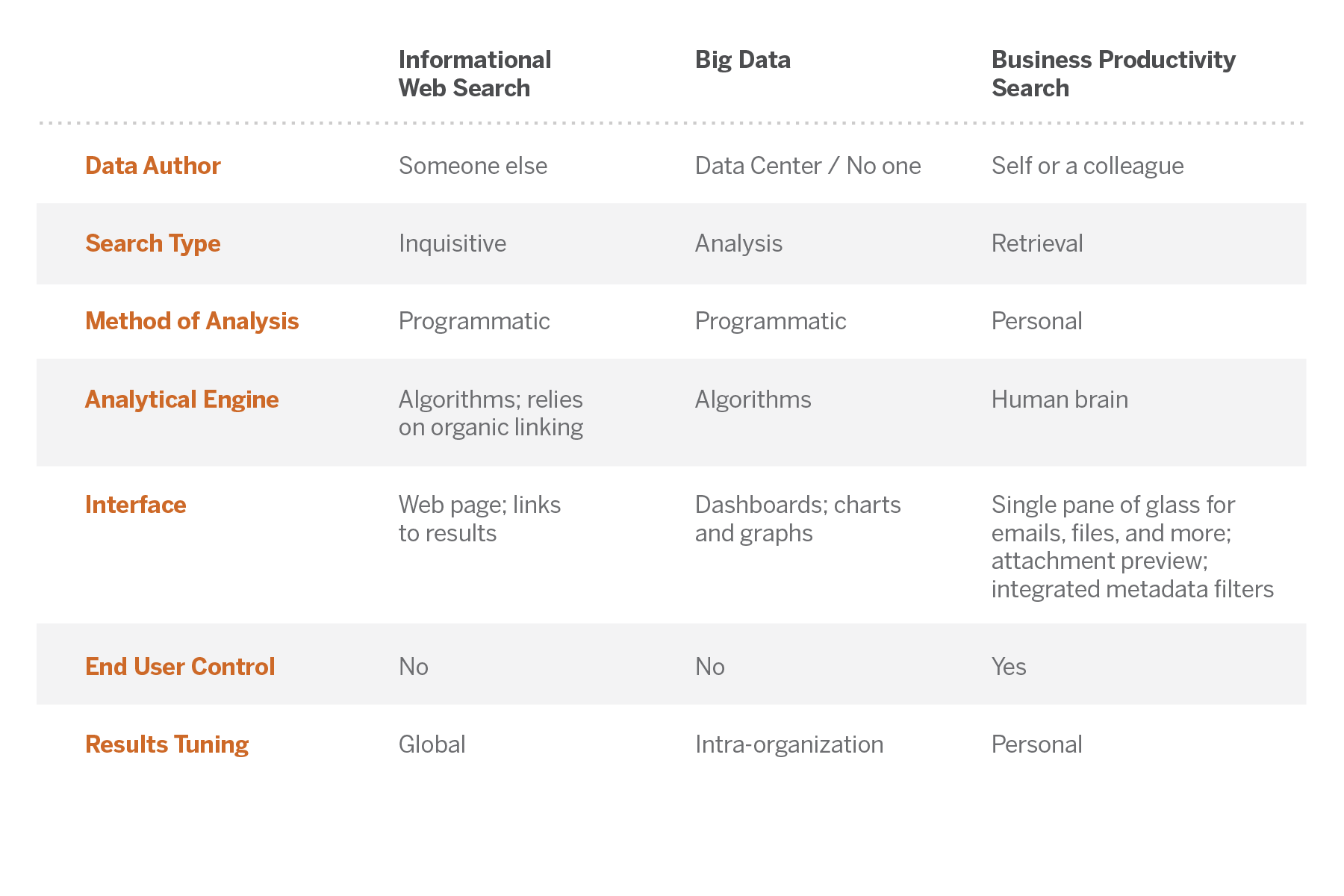
So in view of this customer and industry feedback, we coined the phrase “business productivity search” to differentiate what X1 focuses on verses most other enterprise search tools, which are typically re-fashioned big data analytics or web search appliances. And the feedback we’ve received on this from end-users and industry experts alike is that this assessment hits the nail on the head. Business productivity search is not big data analytics and it is not web retrieval. It is its own use case with a workflow and interface that is tailored to the end users. X1 provides the end-user with a powerful yet user-friendly and iterative means to quickly retrieve their business documents and emails using their own memory recall as opposed to generic algorithms that generate false positives and a workflow ill-suited to business productivity search.

This analysis is crystalized in the accompanying chart differentiating X1’s approach to business productivity search versus big data analytics and web search.

3_forms_table

Click image to enlarge

These points are further explained in our four page white paper: Why Enterprise Search Fails in Most Cases…and How to Fix It.   But perhaps the most compelling illustration is this testimonial from 2013 Nobel Prize Winner in Chemistry and Stanford professor Dr. Michael Levitt, who states: “X1 is an intimate part of my workflow — it is essentially an extension of my mind when I engage in information retrieval, which is many times an hour during my workday.” In my opinion, you will not find that level of enthusiasm by end-users for other enterprise search platforms.

And X1 is a platform. Users need a single-pane-of-glass view to all of their information – email, files, SharePoint, archives like Symantec Enterprise Vault, and other enterprise repositories.  X1 Search 8 and our enterprise extension X1 Rapid Discovery provides just that – a user-friendly interface to all information that lets workers use their minds to find what they are looking for in an iterative search tailored by the end user.

But the hundreds of thousands of X1 end users know all this. The key takeaway for CIOs and other IT executives is that search is an inherently personal user experience, and the number one requirement, by far, for a successful search initiative is enthusiastic end-user adaptation. If the business professionals in your organization are not passionately embracing the search solution, then nothing else matters.

Leave a comment

Filed under Business Productivity Search, Enterprise Search